Note for Logar users: These Bluetooth temperature sensors are an ideal addition to your beekeeping equipment — also for beekeepers who use Logar products. Used together with Logar equipment and Logar honey extractors they enable comprehensive apiary monitoring and provide better information for decisions at the apiary.
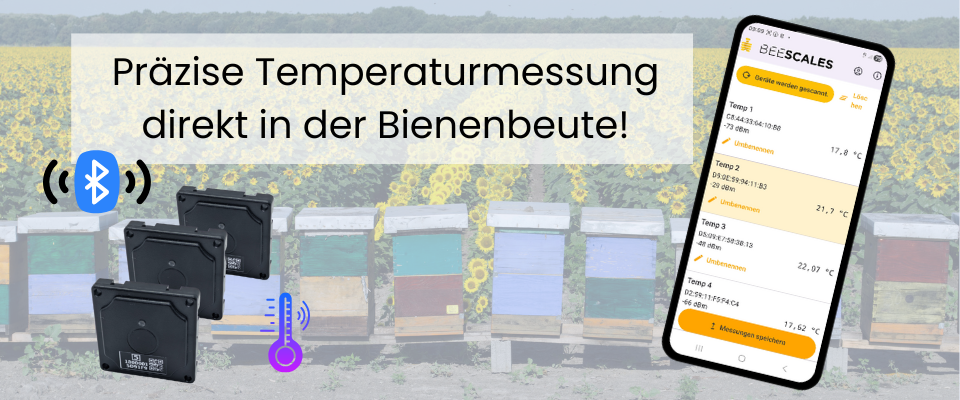

Why measure temperature inside the hive?
The temperature in the brood nest is one of the most reliable live indicators of a colony's condition. Bees regulate it very precisely — characteristic temperature patterns directly reflect events inside the hive. Thanks to affordable sensors you can equip all colonies at an apiary and keep the whole site under observation.
Early detection of brood start
When the queen begins laying in spring, the brood-nest temperature stabilises around 34–35 °C. You can see the start of brood rearing early and plan expansions and initial inspections accordingly.
Detect queen problems in time
If the temperature falls sharply after a stable phase or becomes erratic, this indicates queenlessness or a weak queen. You can intervene before the colony declines severely.
Monitor swarming mood
Many colonies show a typical temperature pattern before swarming: a slight rise and increased fluctuations. The sensor helps detect swarming mood early, before the colony leaves.
Check overwintering without opening the hive
In winter you can use temperature to see whether the hive is active, is weakening, or whether a colony has died — without opening the hive and without disturbing the bees.
Fewer interventions, less stress
Every inspection cools the brood nest and costs the colony energy. With temperature data you can schedule checks more precisely and reduce unnecessary openings — benefiting both the bees and honey yield.
View all colonies at the apiary
The sensors are priced so affordably that you can equip all colonies at a site. At a glance you can see which colonies are strong, which are showing anomalies, and where a physical inspection is actually needed.
Android app for reading & upload
Measurements are read out with a mobile Android app. The app displays the temperature curves of all sensors at an apiary side by side. With one tap the data can be uploaded to the server, where it is available for later analysis and long-term comparisons.
Gateway with SIM card (from spring 2026)
From spring 2026 a gateway with an integrated SIM card will be available. It will read the temperature data from all sensors at the apiary autonomously and send it automatically to the server — ideal for remote sites where you are not present regularly or do not want to use a smartphone every time.
BeeScales.io Diagnostics — Bluetooth app for hive monitoring
BeeScales.io Diagnostics is a mobile app that connects to your BeeScales scales and Bluetooth temperature sensors at the apiary. It is designed for quick on-site checks and for sending measurements to your BeeScales account.
What the app can do
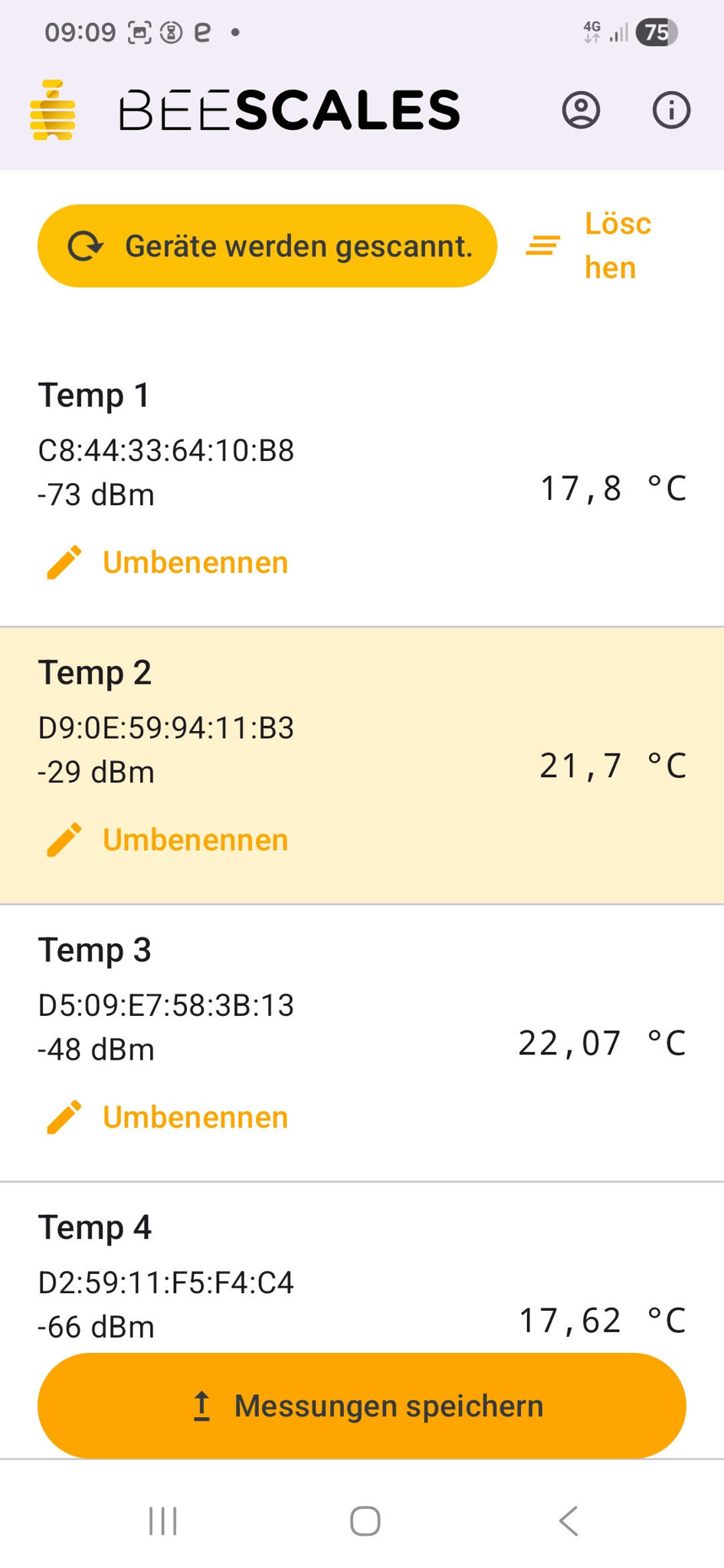
- All sensors nearby at a glance
The app scans all compatible Bluetooth temperature sensors in range and lists them. You immediately see the current temperature for each colony at a location.
- Instant identification with the sensor button
Each temperature sensor has a button. Pressing it highlights the corresponding sensor entry in the app. This makes it easy to tell which physical sensor in the apiary matches which entry in the app.
- Individual names for each colony
Assign a unique name to each sensor (e.g. Colony 1 – Queen 2024, Nuc 3). This keeps the measurements clearly associated with the correct colony even when you have many sensors.
- Monitor colony health in winter and spring
Place the sensors directly in or above the winter cluster. Stable, appropriate temperatures help evaluate colony strength, brood development and overwintering — all without opening the hive.
- Save measurements to your account
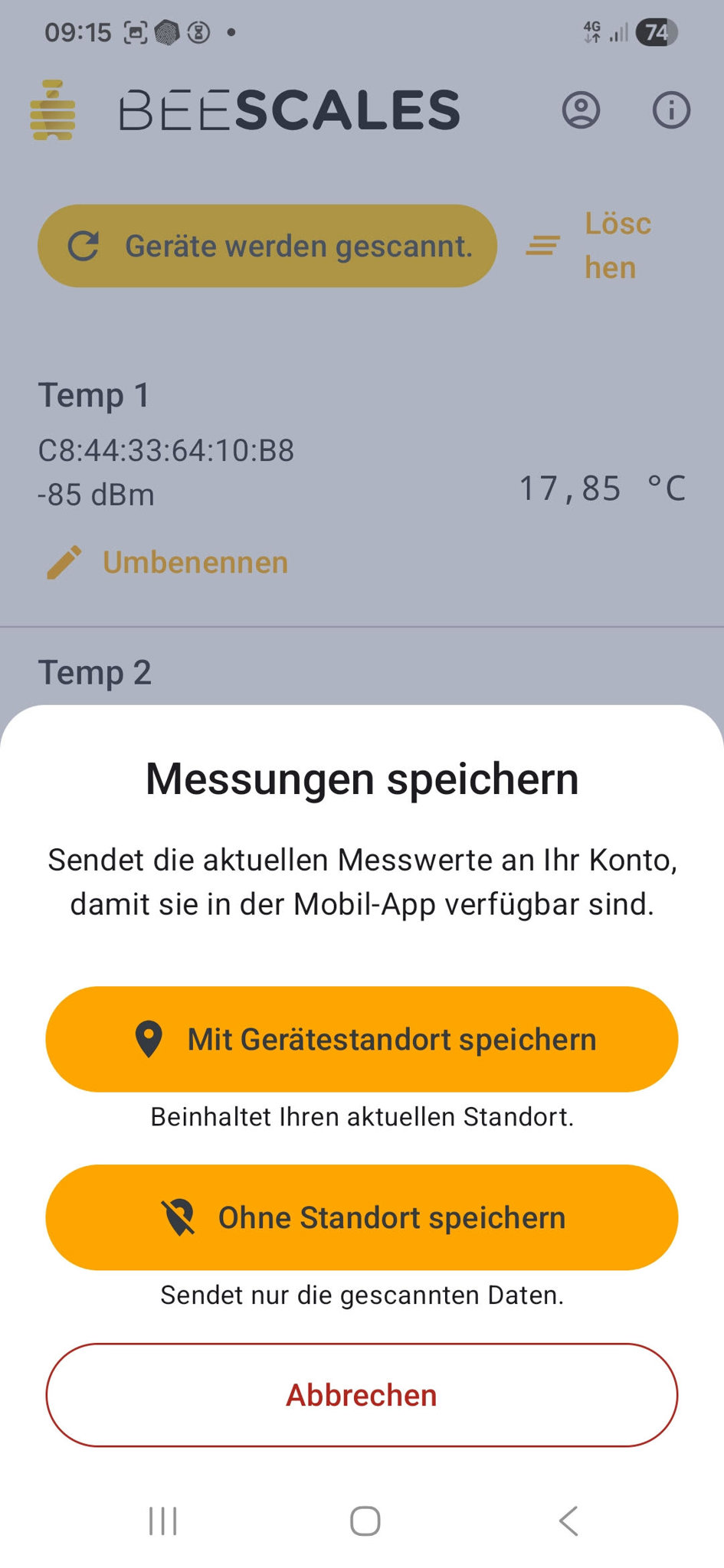
With one tap you can send the current readings from all detected sensors to your BeeScales account so they are available later in the mobile or web app.
You can choose whether to save:
- With device location — measurements + current GPS position of the smartphone
- Without location — sensor data only
- Support for Bluetooth BeeScales
The same app also connects to BeeScales Bluetooth scales (e.g. the Compact scale with e-paper display) and can upload weight data together with temperature readings.
- Easy operation in the field
Large buttons, clear fonts and coloured highlights make the app easy to use even with gloves and in sunlight.
Typical temperature patterns — what do the curves show?
The following examples show common patterns you will often see in practice. The diagrams are language-neutral and can be explained in any language.
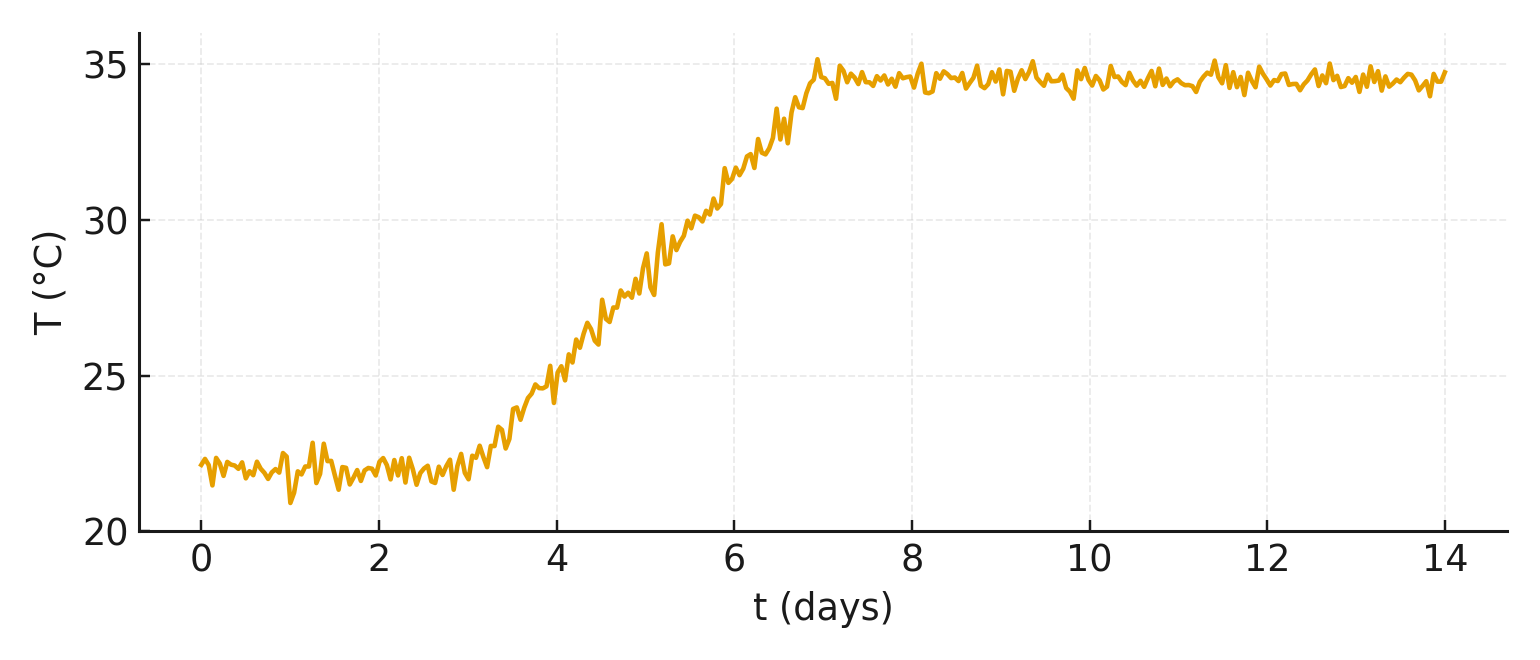 Example 1: Start of brood rearing in spring
Temperature rises from the winter/transition range and stabilises in the brood-nest range (approx. 34–35 °C). The colony is developing and the queen is actively laying.
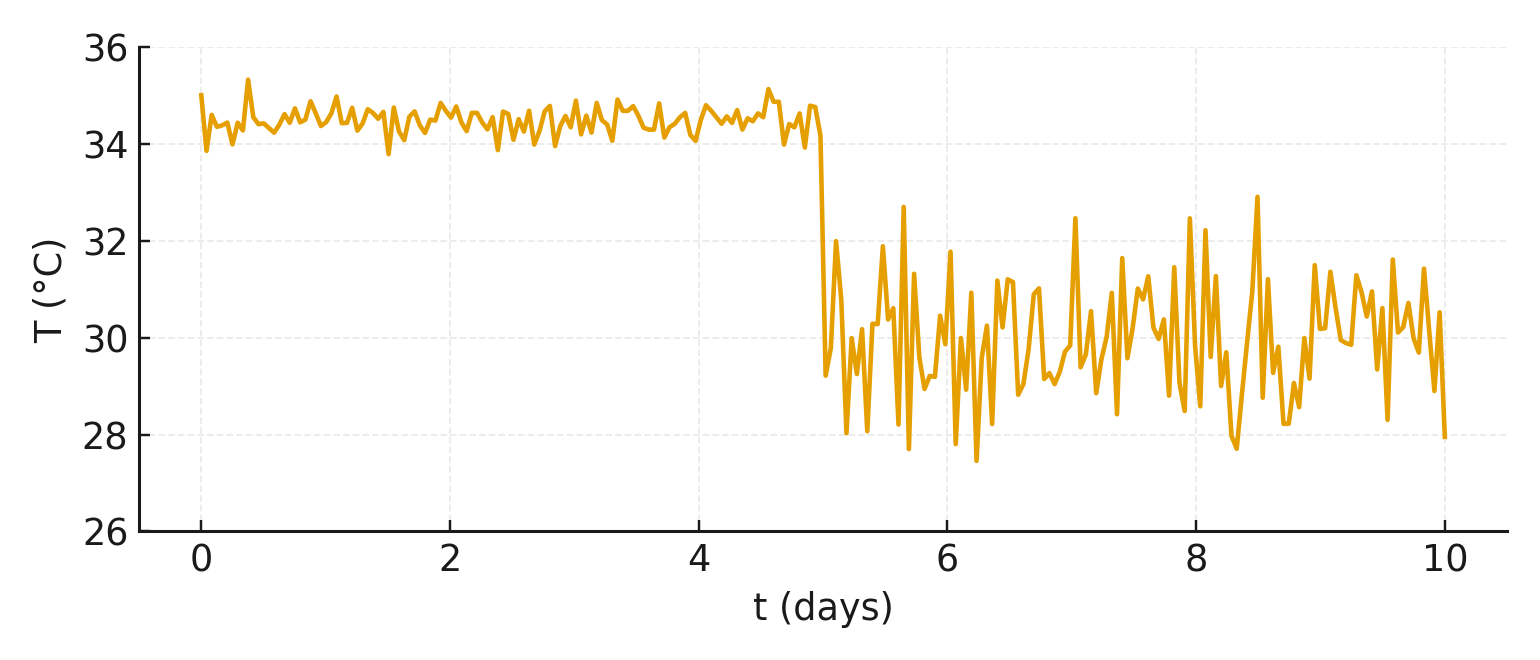 Example 2: Queen problem / queenlessness
After a phase of stable brood temperature the curve drops noticeably and becomes erratic. Possible cause: lost queen or interrupted brood rearing. An inspection is strongly recommended.
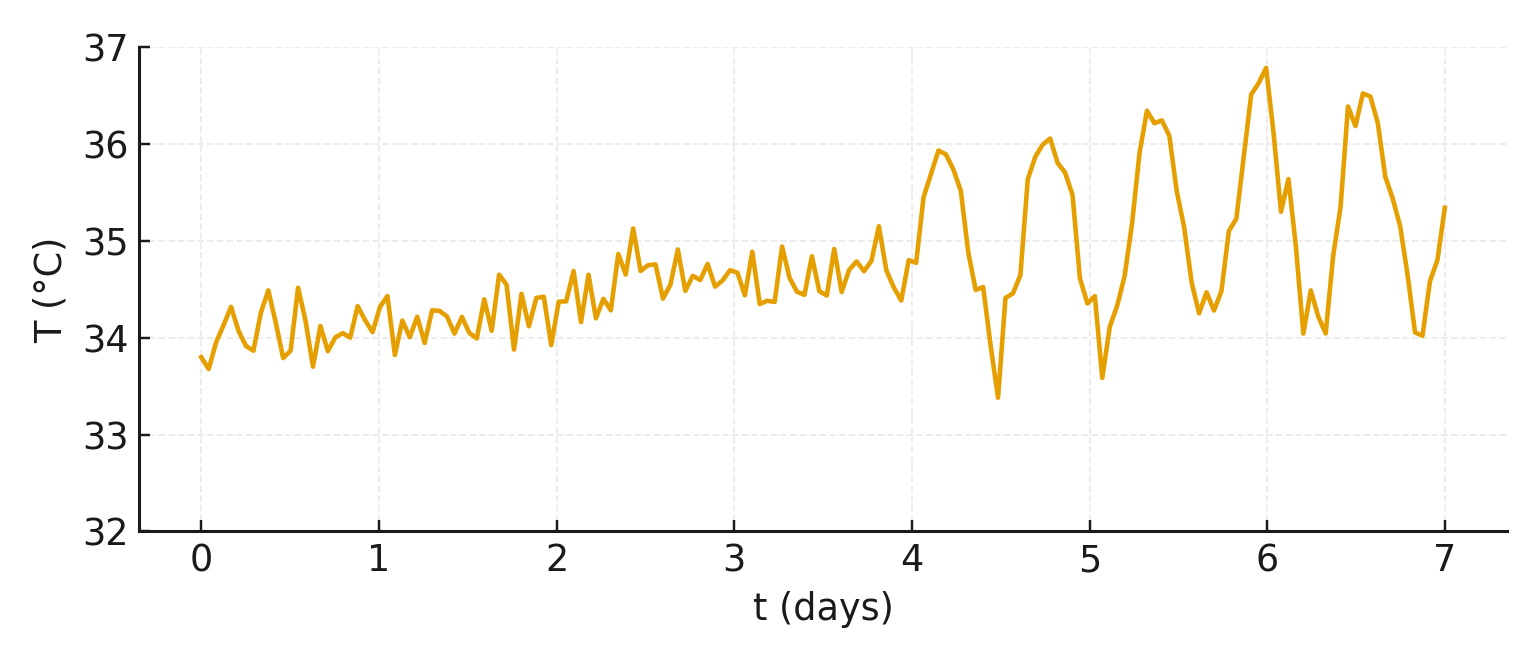 Example 3: Swarming mood
Slight temperature rise and characteristic wave patterns over 1–3 days. The colony is very active and may be preparing to swarm. Check for queen cells and consider appropriate measures.
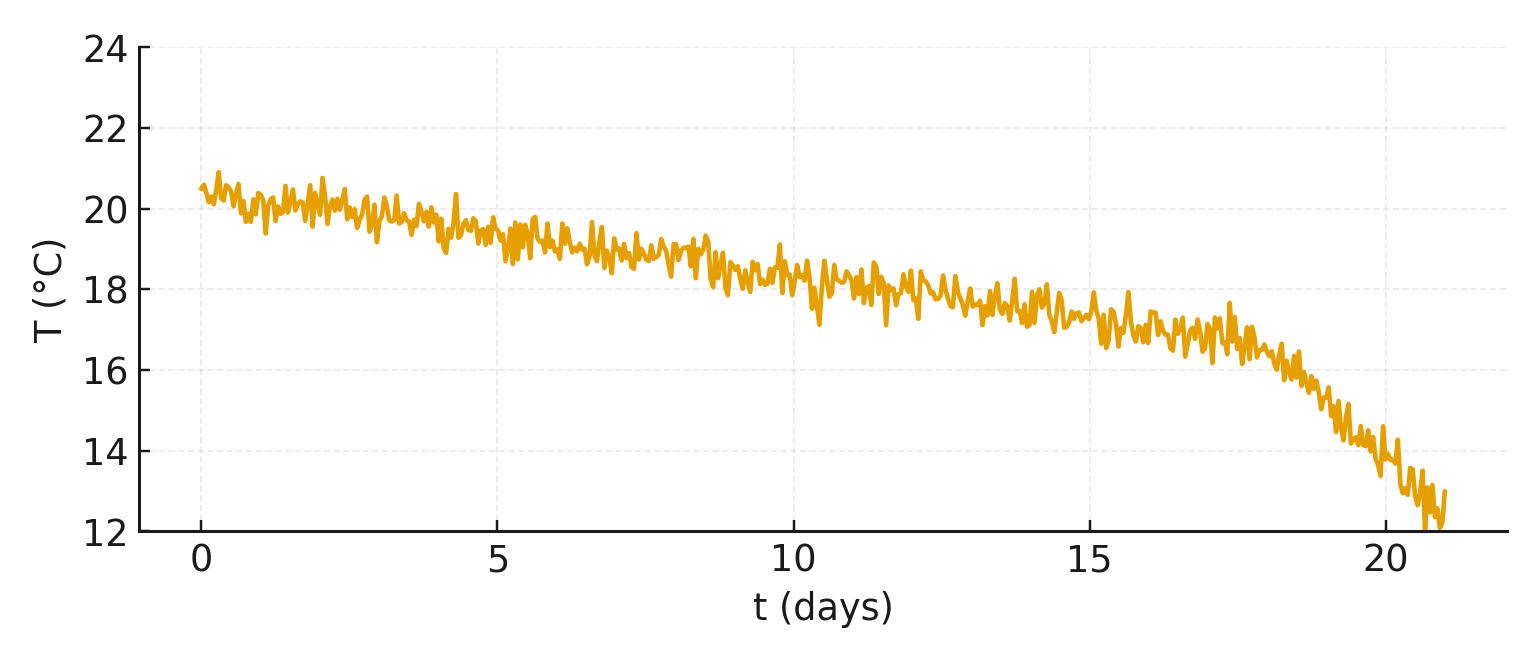 Example 4: Weakening in winter
Slow, persistent downward trend and loss of a stable cluster temperature. The colony is weakening or may have died. Inspect the hive at the next opportunity.
Frequently Asked Questions (FAQ)
How do I read the sensor values?
The sensor values are read using an Android app. When you visit the apiary the app connects via Bluetooth to the sensors and clearly displays the temperature curves of all colonies at that site.
Can I save the data for later analysis?
Yes. From the Android app you can upload the measurement data to the server with one tap. There they are available for long-term comparisons, trend analysis and documentation.
Do I absolutely need a smartphone?
For the first generation of the system, readout is done via an Android app. From spring 2026 you can also use a gateway with a SIM card that will read the data and send it to the server automatically — without a manual app call on site.
Do I need an internet connection at the apiary?
An internet connection is not required for reading data with the Android app — the connection to the sensor runs via Bluetooth. Internet is only needed if you want to upload data to the server. The gateway with SIM card (from spring 2026) will handle data transmission itself.
What temperatures are normal in the brood nest?
During active brood rearing the temperature is typically between 33 and 35.5 °C. In winter or broodless phases lower and somewhat more variable values are normal.
How does the sensor help with overwintering?
You can see whether the cluster is active, whether a colony is slowly weakening or whether sudden drops occur. This lets you react in time, for example by planning feed checks or uniting weak colonies.
Can I monitor multiple colonies at once?
Yes. Each sensor belongs to a specific colony. In the app you can manage multiple sensors and compare the temperature curves of all colonies at an apiary. The affordable sensor prices make it possible to equip every colony at the site and keep the whole apiary in view.